
Most people who ask me about Google Business video verification have already failed it twice. Some have failed it six times. They film the shop, the street and the logo, and still get the same "we couldn't verify your business" message with no clear reason.
I answer questions in Google's official Help Community, and I've replied to 18 threads about video verification alone. Because the same mistakes come up again and again, this guide covers what to film for your type of business, why videos get rejected, and what to fix before you record again.
Verification is only one of the Business Profile problems I answer most. The rest, from ownership to suspensions, are in my Google Business Profile problems guide.
What Does Google Want to See in a Business Verification Video?
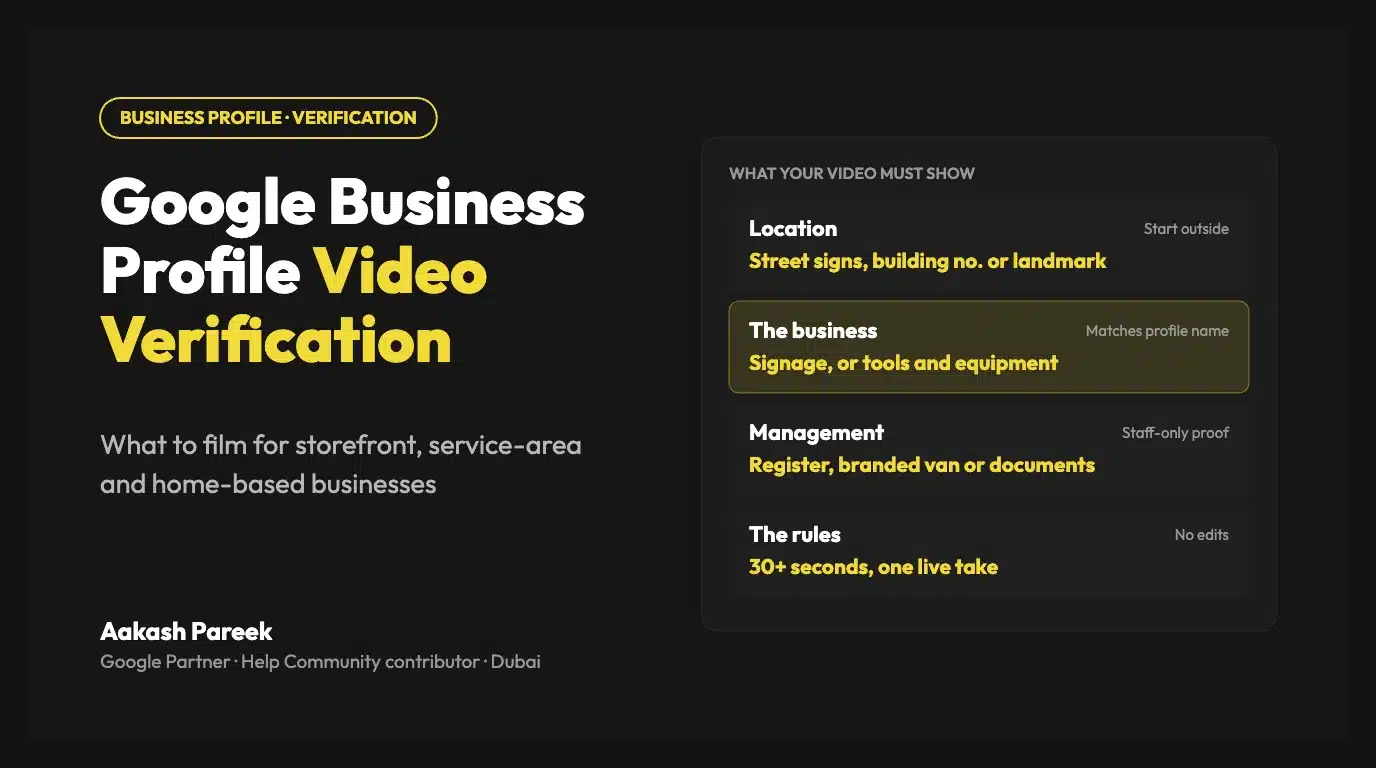
Google's checklist has three parts, and your video has to cover all of them in one take. The exact shots depend on whether you're a storefront or a service-area business.
| What Google checks | Storefront or hybrid business | Service-area business |
|---|---|---|
| Where the business is | Street signs, building numbers, nearby businesses or familiar places | Street signs, landmarks or other markers near your business address |
| Proof the business exists | Your storefront or signage, with the name on a permanent fixture that matches your profile | Tools, equipment, products, your workspace, business cards or branded clothing |
| Proof you manage it | Places only staff can reach: cash register, kitchen, storeroom or POS system | Doing the work, unlocking a branded van, or a permit, invoice or utility bill in the profile's name |
On top of that, the video itself has to follow a few rules from Google's video verification page:
- It runs for at least 30 seconds.
- You record it live through your Business Profile on your phone. You can't upload a video you filmed earlier.
- It's one complete take, with no edits and no breaks.
- It doesn't show bank, tax or ID numbers, private information or other people's faces.
After you upload it, Google says the review can take up to 5 business days.
Why Was My Business Video Verification Rejected?
When I go back through those 18 threads, the same causes keep showing up. Usually it's one of these:
- The profile is set up as the wrong type. If your address is visible on the profile, Google treats you as a storefront. So it expects a signboard and a cash register, even if customers never come to you. This came up in 5 of the 18 threads.
- One of the three parts is missing. People film the street and the shop but forget proof of management. Consultants and home-based owners often forget to show the business name on anything official.
- The location isn't clear. The video starts indoors, so the reviewer can't match it to the pin on Google Maps.
- The documents can't be read. A licence held up for one second in a dark room doesn't count. I suspect this is behind more rejections than people think.
- The video was stopped and restarted. Google wants one continuous take, so a pause to walk to the car breaks the rule.
- Private details are on screen. A trade licence or certificate with a visible tax or ID number is a problem, so cover those numbers with your thumb.
Storefront or Service-Area: Which One Is Your Business?
This is the first thing I check, because it changes the whole video. According to Google's guidelines for representing your business, a business that serves customers at their location should hide its address. Google's own example is a plumber who runs the business from home.
A hybrid setup, where you show your address and a service area, only fits if the place has staff and customers can visit during your opening hours. Otherwise, you're a service-area business.
In Dubai this catches out a lot of service companies. AC repair, cleaning, moving and home salon businesses often have an office address on their trade licence, but customers never go there. If that address is showing on the profile, Google will ask for storefront proof you can't give.
Here's how to hide the address, using the steps on Google's business address help page:
- Go to business.google.com and open your profile.
- Select Edit profile, then Location.
- Next to "Business location", select Edit.
- Turn off Show business address to customers.
- Select Save, then check your service areas are set.
Then wait until that edit is live before you record again. In one thread the owner had already filmed three videos while the address was still showing, and each rejection listed storefront items like a signboard and a cash register.
Video Rejected Again?
Send me a screenshot of your "Review issues" screen and tell me how your business works. I'll tell you exactly what your next video needs to show, before you use another attempt. No obligation.
Get My Free Profile Check → Prefer WhatsApp? Message me directlyVideo Verification for a Storefront Business: What to Film
Think of the video as a walk from the street to the back office, without ever stopping the recording. This is the shot list I give storefront owners:
- Start outside. Film a street sign, your building number or the shops next door, so Google can match the spot to your map pin.
- Walk to your entrance. Show your sign clearly. The name on it has to match the name on your Business Profile.
- Go inside and behind the counter. Unlock the door, open the register or POS, or walk into the kitchen or storeroom.
- Keep going past 30 seconds. Then stop and upload. A slow, steady video beats a rushed one.
If you're inside a mall or a tower, as many Dubai shops and clinics are, start at the building entrance or name and walk straight to your unit. The goal is the same: the reviewer should never lose track of where they are.
Video Verification for a Service-Area Business: What to Film
You don't need a shop for this. Instead, Google wants the area around your base, proof that the business is real, and proof that you run it. For example, here's what I've suggested to different trades in the Help Community:
| Business type | Proof the business exists | Proof you manage it |
|---|---|---|
| Cleaning or property care | Cleaning equipment and uniforms | Your booking system open on a phone or laptop, or an invoice in the business name |
| Cabinet or interior installer | Tools and material samples | Your design software, a branded van or the business registration |
| Delivery-based seller | The products you deliver | Business registration and seller's permit, held close and steady |
| Plant nursery or landscaper | Nursery equipment and stock | Unlocking the branded truck, plus a registration certificate in the business name |
Record it in this order:
- Start near your base. Show a street sign, landmark or building number close to the address on your profile.
- Show the business. Pan across your tools, equipment, uniform or business cards.
- Show that you run it. Unlock your branded vehicle, start a job, or hold a permit, invoice or utility bill in the business name close to the camera.
- Cover sensitive numbers. Keep your thumb over any tax or ID number on the document.
How Do You Pass Video Verification for a Home-Based Business?
Google says home-based businesses can film landmarks and signs in their immediate neighbourhood. So you don't have to show your front door, and the address stays hidden on the profile.
What if there are no street signs or house numbers? Two people I helped lived in places like that, one in a rural village and one on a mountain. Google accepts building numbers, nearby businesses or a familiar landmark too. Even the view down your road helps, as long as it ties the video to your spot on the map. You also don't need neighbouring businesses if there aren't any.
When the nearest sign is a few minutes away, start there and walk back without stopping. Google's help page only sets a minimum of 30 seconds, so walk at a normal pace and keep recording.
What If You're a Consultant, Agent, Trainer or Tour Guide?
These are the hardest cases, because there's no van and no toolbox. Still, each of them has something real to show:
- If you're a consultant, show a certificate or registration with the business name, then log into your client workspace or open the business email on your laptop.
- Real estate agents can show their licence or brokerage paperwork with their name, then their listings or the portal they work in.
- Personal trainers working out of a commercial gym can't put up permanent signage, so they should set up as a service-area business. Then the video shows equipment, branded clothing and a session or an invoice.
- Tour guides can show their official guide licence, ID badge and other business documents.
Before you film, check the name on your profile matches the name on the document you'll show. If they don't match, the reviewer has nothing to tie the two together.
What Should You Do Before Recording Again?
In 7 of the 18 threads, my first advice was the same: open "Review issues" before anything else. Then follow these steps:
- Tap Review issues on your profile. Google lists what the last video missed, for example "business name not visible", "no nearby area shown" or missing proof that you're allowed to run the business.
- Fix the profile setup first. If you're really a service-area business, hide the address and wait for the edit to go live.
- Plan the route. Write your shot list and walk it once without recording.
- Get the light right. Film documents near a window or under a bright light, close to the lens, for a few seconds each.
- Record everything again. Google asks you to include everything from your first video plus whatever was missing.
- Upload and wait. Allow up to 5 business days, and don't start a new profile in the meantime.
If the profile was verified before and already has reviews, keep working on that same profile. A new profile starts again from zero reviews.
Can Google Support Give You a Different Verification Method?
Usually not. Google picks your verification methods automatically, based on your business type, public information, region and opening hours, and Google's verification help page says you can't change them. I've had to give this answer in 4 of the 18 threads, because people were waiting on support cases for weeks.
So if your screen is asking for a new video, the last one wasn't accepted. Record again rather than waiting on the case. If Google offers a live video call instead, that's another route, but it only runs during your business hours and you need to be at the business.
Why Won't the Video Verification Screen Open on My Business Profile?
Usually it's phone permissions. Google asks for access to your location, camera and microphone before recording, and if you tapped "Don't allow" once, the camera won't open.
- On your phone, open Settings > Apps > Google Maps (or the Google app) > Permissions.
- Allow Camera, Microphone and Location.
- Open your profile in Google Maps and tap Get verified again.
- If the upload fails, try uploading again on a stronger connection.
If an SMS code is your other option, wait for the first code instead of tapping "resend" again and again. In my experience, repeated requests just make it harder to know which code is the live one.
One more case: if the person who'll record the video isn't a manager on the profile yet, they can't verify it. In one thread the email invitation sat on "Pending" for days. Google support was able to send a manager invitation link, so ask for exactly that on your existing case.
Why Is Google Asking You to Verify Again?
Google says changes to your business information can trigger re-verification, so a new name, address or category is the usual reason. Then you'll see "Get verified" again on a profile that was fine before.
Another cause I've seen is reviews from friends. Google's policy treats reviews from family, employees or anyone with a conflict of interest as fake engagement. In one thread a few friendly reviews were followed by a verification request, so ask friends to delete theirs, and only ask real customers from now on.
Verification only gets you onto the map. Getting into the top three results for the searches that bring customers is a separate job. My local SEO and Google Business Profile guide for Dubai covers that part, and my SEO services in Dubai page shows how I handle profiles for clients.
Stuck on Business Video Verification?
Send me the rejection message and a line about how your business works. I'll check whether your profile type is right and give you a shot list for your next video, so you don't waste another attempt.
Send Me Your Rejection on WhatsApp → Usually a reply within the hour during UAE business hours. Or email hello@aakashpareek.in