
Shifting your domain from GoDaddy to Hostinger is simpler than you might think. This guide outlines the easy steps to ensure a seamless transfer process. Let’s explore how to smoothly transition your domain between these two platforms.
If you decided to point or transfer domain from GoDaddy to Hostinger, you’ve come to the right place.
Hostinger is one of the fastest and most reliable hosting solutions on the Indian market. Besides offering multiple hosting options, Hostinger also includes abundant resources and premium features on its plans, ensuring you get the best value for your money.
In this article, I’ll provide you with a detailed guide on how to transfer a domain from GoDaddy to Hostinger’s web hosting service. If you still have doubts, I’ll go over the reasons why Hostinger is a better choice than GoDaddy.
Difference between pointing a domain and transferring a domain,
Before we get to the steps, let’s discuss the difference between transferring a domain and pointing a domain.
When you point a domain name from one domain registrar to another, your domain name remains hosted by the original registrar. That very same provider will provide you with support in exchange for the yearly domain fees you pay to it.
Pointing a domain name to a website is a necessary step you should take if your domain name currently points to a name server of a different hosting provider. Only then can the website become accessible on the web via that domain.
Meanwhile, transferring a domain name means moving it to another domain registrar. Many people opt for this option because they want to change the domain’s ownership, get better features, or simplify the website and domain management process.
How to transfer a domain name from GoDaddy to Hostinger.
Transferring a domain from GoDaddy to Hostinger is not as complicated as you might think. Let me walk you through the steps of domain name transfer in two stages.
Stage one: Get the authorization code from GoDaddy
- Login to your current GoDaddy account.
- Navigate to the Domain Control Center, select your domain name, and click Manage.
- Scroll down to Additional settings and select Transfer domain away from GoDaddy on the right.
- Review the checklist and then click on Continue with transfer.
- Select Click here to see Authorization Code and copy the EPP code.
Stage two: Initiate the domain transfer to Hostinger
- Login to your Hostinger hosting account.
- Click on Domains, select Transfer Domain.
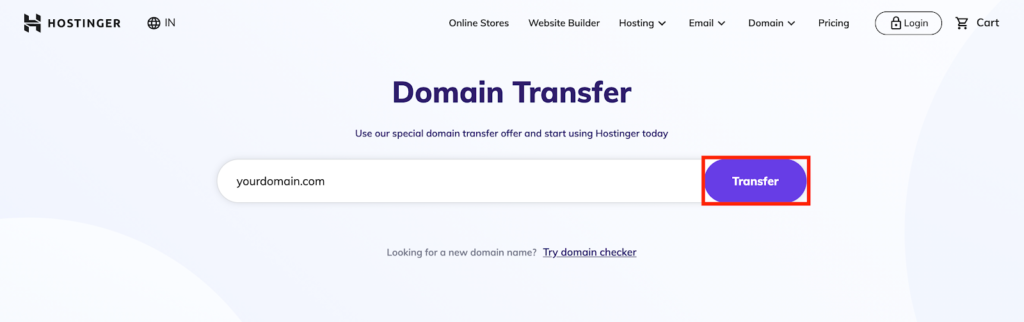
3. Enter your domain name in the appointed space on the domain transfer page and click Transfer.
4. After making the payment, enter the EPP code to begin the domain transfer process. Your domain should be fully transferred onto Hostinger’s domain registrar within the next 14 days.
Why is my domain locked for 60 days?
To prevent domain hijacking and promote privacy protection, ICANN enforces all domain registrars to lock domains for the first 60 days after they have been transferred or registered. The lockdown also applies to domains that have had their contact information changed recently.
During this period, you’re only allowed to point the domain to another website. Domain transfer can only be done after the lockdown period is over.
How to point a domain to Hostinger
To point a domain from your current registrar to Hostinger, you’ll first have to change your name servers. This will automatically configure your DNS zone to match Hostinger’s IP address.
You can do this in eight simple steps, divided into two stages.
Stage one: Locate Hostinger’s name servers
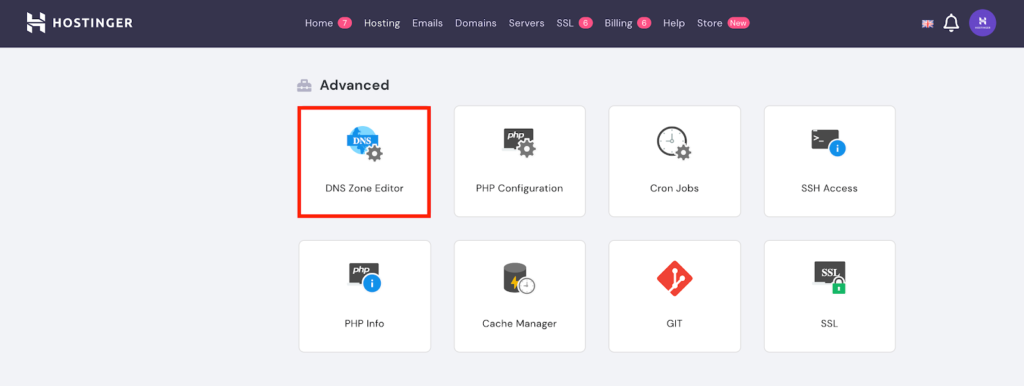
- Scroll down the main page of the hPanel until you reach the Advanced category. Then, click on DNS Zone Editor.
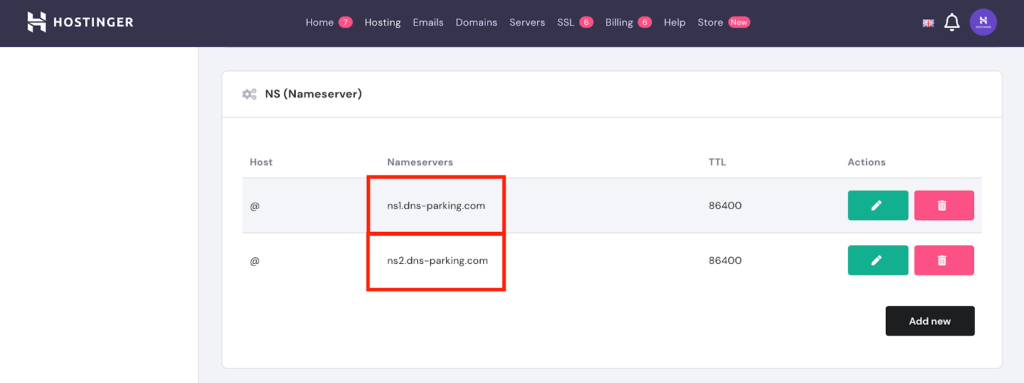
2. Copy the addresses showcased in the NS (Nameserver) section.
Stage two: Point the domain out of GoDaddy
- Login to your GoDaddy account.
- Navigate to Domains, select your domain name, and click Manage.
- Scroll down to Additional settings and click Manage DNS on the right.
- Go to the Nameservers section and click the Change button.
- Select Connect My Domain to a Website and then click on Enter my own nameservers (advanced) at the bottom left corner.
- Input the name server addresses you copied from Hostinger, and then save the changes.
Your DNS should fully propagate within the next 24 hours, after which the domain transfer will be fully complete and your account — ready to use.
Why you should transfer your domain to Hostinger
If you’re still unsure whether it’s a good idea to transfer your domain from your current web host to Hostinger, let’s look at what the benefits of going with this web hosting provider would be.
If you plan on creating a website, Hostinger has various hosting options to choose from — shared hosting, VPS hosting, dedicated server hosting, WordPress hosting, and cloud hosting.
Hostinger’s plans start at ₹59/month — ₹10 less than GoDaddy’s lowest-tier plan.
All Hostinger hosting plans come with a free SSL certificate for privacy protection, email accounts, and 24/7 customer support via a live chat, email, and ticket system.
Hostinger also provides a custom-built control panel, which takes inspiration from cPanel but offers improved control options for your account.
Should you need another domain, selected Hostinger plans will cover the first-year domain registration fee. If your hosting plan doesn’t include a free domain, you can purchase one from its registrar for the starting price of ₹51/year.
While the GoDaddy domain price starts out lower than that of a Hostinger domain, popular TLDs like .com and .in require a two-year subscription with a higher renewal price. Free domain names included on GoDaddy’s plans are limited to selected TLDs only.
Additionally, GoDaddy adds a free SSL certificate on selected web hosting plans only — a major disadvantage for users who want to build a business website.
Final thoughts
Overall, I believe that Hostinger is the best web hosting company around. It manages to keep the prices low for every hosting option while providing more features than its competitors, including GoDaddy.
Hostinger has also made the domain transfer process as easy and smooth as it can be. If you want to transfer your domain somewhere else, you should consider Hostinger as a possible host.
This post may contain affiliate links. When you use them to buy a service, I may earn a commission.
How I Got my LinkedIn Top Voice Badge