
If you've decided to move your domain from GoDaddy to Hostinger, the process itself is more mechanical than technical — mostly copying a code out of one dashboard and pasting it into another. I've run this migration for client sites more times than I can count, and the thing people actually trip over usually isn't the transfer steps. It's not knowing whether they even need a full transfer, or just a nameserver change.
This guide walks through both paths, the ICANN rule that catches almost everyone off guard the first time, and where I'd actually push back on picking Hostinger.
Pointing vs. transferring — pick the right one first
These get used interchangeably and they shouldn't be. Pointing a domain means your registrar stays the same — you're still paying GoDaddy for the domain itself — but you change the nameservers so the website content loads from Hostinger's servers instead. Transferring moves the domain's actual registration to Hostinger, so it becomes your registrar going forward — renewals, ownership records, and support all move with it.
If you just want your site hosted on Hostinger without dealing with registrar paperwork, skip ahead to pointing the domain. If you want everything — domain and hosting — under one account, keep reading.
Stage 1Step 1: Get the authorization code from GoDaddy
Every domain transfer starts with an EPP code (also called an authorization code) — a one-time password only your current registrar can issue.
Log in to GoDaddy
Use your existing GoDaddy account credentials.
Open the Domain Control Center
Select the domain you want to move and click Manage.
Find Additional Settings
Scroll down and select "Transfer domain away from GoDaddy" on the right.
Confirm the transfer checklist
GoDaddy shows a short checklist (domain must be unlocked, 60+ days old, privacy off). Click Continue with transfer.
Copy the EPP code
Click "Click here to see Authorization Code" and copy it somewhere safe — you'll need it in the next stage.
Before you move on: make sure the domain is unlocked and WHOIS/ID privacy protection is temporarily switched off in GoDaddy. Registrars reject the transfer if either is still active.
Step 2: Initiate the transfer on Hostinger
Heads up: the screenshots below are from Hostinger's hPanel — the labels and menu positions have stayed stable, but Hostinger does redesign hPanel from time to time, so a button or two might sit somewhere slightly different when you actually get there. Same steps, possibly a different pixel.
Log in to your Hostinger account
If you don't have one yet, you can sign up through Hostinger in a couple of minutes.
Go to Domains → Transfer Domain
From the hPanel dashboard, open the Domains section.

The Transfer Domain screen inside Hostinger's hPanel
Enter your domain name and click Transfer
Type the exact domain (no www, no https://).
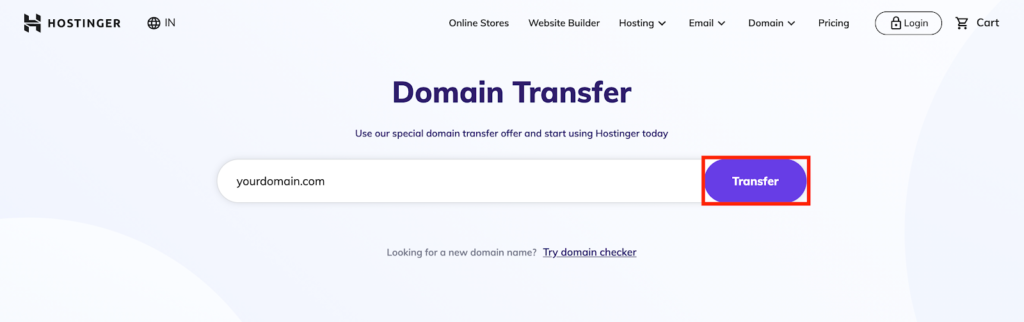
Entering the domain before checkout
Pay and paste in the EPP code
After checkout, Hostinger asks for the authorization code from Stage 1. Paste it in to kick off the transfer.
From here it's mostly waiting. The domain is fully moved to Hostinger's registrar within about 14 days, and you'll get email confirmations from both registrars along the way.
Why is my domain locked for 60 days?
This one catches people off guard and it's not a Hostinger or GoDaddy policy — it's an ICANN rule that applies everywhere. Any domain that was just transferred, or that recently had its registrant contact information changed, gets a mandatory 60-day lock to prevent hijacking.
During the lock you can still point the domain to a different host. You just can't initiate another registrar transfer until the 60 days are up.
Common reasons a transfer gets rejected
Most failed transfers come down to one of five things. I've seen every one of these hold up a client's migration at least once, so it's worth checking each before you start rather than after Hostinger emails you a rejection.
- Domain is still locked. GoDaddy locks domains by default. Unlocking it is step 4 in Stage 1 above — easy to miss if you skim the checklist.
- Privacy protection is still on. If GoDaddy's WHOIS privacy is active, the registry can't verify your contact details against the transfer request. Turn it off, wait a few minutes, then generate the EPP code.
- Domain is under 60 days old. Newly registered domains, or ones with a recent owner-detail change, are locked by ICANN regardless of what either registrar does. There's no workaround — you wait it out.
- EPP code typed wrong, or expired. The code is case-sensitive and usually only valid for a limited window. If it's been sitting in a notes app for a week, generate a fresh one.
- Registrant email doesn't match. Hostinger sends a confirmation to the email on file with GoDaddy. If that inbox is old or you've since changed emails in GoDaddy without updating WHOIS, the approval email never reaches you and the transfer times out.
Just want to point the domain instead?
If you'd rather keep GoDaddy as the registrar and only move where the website itself lives, change the nameservers instead of transferring anything. It's faster and doesn't touch domain ownership at all.
Find Hostinger's nameservers
Open the DNS Zone Editor
In hPanel, scroll to the Advanced section and click DNS Zone Editor.
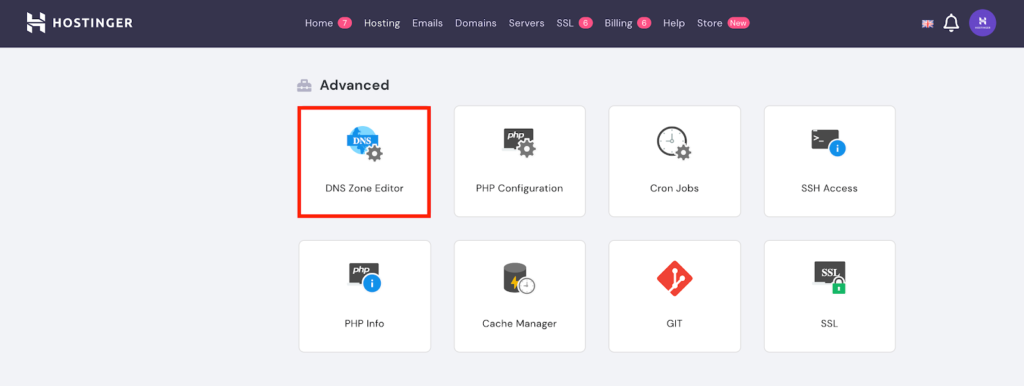
The Advanced panel in hPanel — DNS Zone Editor is where the nameserver records live
Copy the NS records
Note down the nameserver addresses listed there — you'll paste these into GoDaddy in the next step.
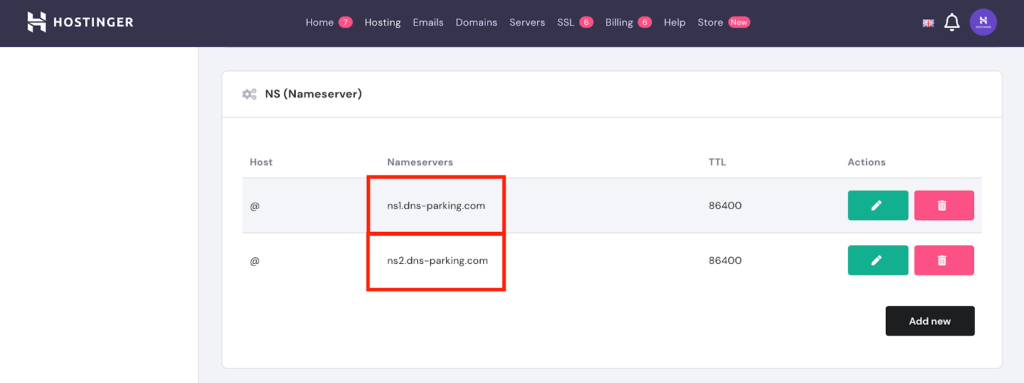
The two nameserver addresses (ns1 and ns2) you'll need for GoDaddy
Update GoDaddy's nameservers
Go to Domains → Manage in GoDaddy
Select the domain, then Manage.
Open Manage DNS under Additional Settings
Find the Nameservers section and click Change.
Choose "Enter my own nameservers"
Select "Connect My Domain to a Website," then "Enter my own nameservers (advanced)."
Paste in Hostinger's nameservers and save
DNS propagation usually finishes within 24 hours.
Hostinger vs. GoDaddy at a glance
The honest reason most people make this move isn't price alone — it's what's included at that price. Hostinger bundles free SSL, a simpler control panel, and free migration help across most of its plans, where GoDaddy tends to gate those behind higher tiers.
| What matters | Hostinger | GoDaddy |
|---|---|---|
| Entry hosting price | From roughly $2–$6/mo (about AED 8–22) on long-term promotional plans* | Comparable entry tier, fewer inclusions |
| Free SSL certificate | Included on all plans | Selected plans only |
| Free domain w/ hosting | Included on annual+ plans | Limited to select TLDs |
| Control panel | Custom hPanel | cPanel / proprietary panel |
| Support | 24/7 live chat | Chat + phone |
| Free migration | Yes, on most plans | Not standard |
*Hosting prices are promotional and change often on both sides — check Hostinger's current pricing before you buy rather than trusting a number in an article.
If price and simplicity are what you're optimizing for, Hostinger is the one I recommend to most clients moving off GoDaddy. It's not the right call for everyone — if you're deep into GoDaddy's ecosystem with email, marketing tools, or enterprise support contracts tied to your account, the migration effort might not be worth it for a modest price difference.
One honest caveat for Dubai/UAE site owners: Hostinger doesn't run a data center inside the UAE — the closest options are usually Singapore or Europe. For most business and blog sites that's a non-issue thanks to their CDN and LiteSpeed setup, and it's still noticeably faster than most local UAE budget hosts. If you're running something latency-sensitive (real-time booking, trading, high-frequency checkout), a UAE-local host is worth comparing before you commit.
Need help with the migration itself?
I handle domain and hosting transfers as part of website development projects for Dubai businesses.
Frequently asked questions
How long does a GoDaddy to Hostinger domain transfer take?
Up to 14 days for the registrar transfer to fully complete, though it's often faster. If you only point the nameservers instead of transferring, that takes about 24 hours to propagate.
Will my website go down during the transfer?
Not if you set up hosting on Hostinger first and only change the nameservers or complete the transfer once the new site is live and tested. The domain transfer itself doesn't touch your live site's uptime.
Do I need to cancel my GoDaddy hosting separately?
Yes. Transferring the domain doesn't cancel any separate GoDaddy hosting plan — you'll need to cancel that on its own to stop being billed for it.
What if my domain is less than 60 days old?
ICANN won't allow a registrar transfer until 60 days have passed since registration or the last contact-info change. You can still point the domain to Hostinger in the meantime.
Does GoDaddy charge a fee to transfer a domain away?
GoDaddy doesn't charge a separate transfer-out fee, but ICANN rules require most TLD transfers to include a one-year renewal at the new registrar, so expect to pay Hostinger's standard renewal price at checkout.
Is Hostinger actually cheaper than GoDaddy long-term?
On hosting, usually yes for the first term thanks to Hostinger's longer promotional discounts — but both providers raise prices at renewal, so compare renewal rates, not just the first-year price, before deciding.
Does it matter that Hostinger has no data center in the UAE?
For most Dubai and UAE business sites, no — Hostinger's CDN and LiteSpeed caching keep load times competitive even without local servers, and it's still faster than many regional budget hosts. It matters more for latency-sensitive apps like real-time booking or trading platforms, where a UAE-based host is worth the extra cost.

Written by Aakash Pareek
Certified Google Partner and freelance digital marketing consultant based in Dubai. I build and migrate client websites regularly, including domain and hosting moves like this one.
This post contains a Hostinger referral link. If you sign up through it, I may earn a commission at no extra cost to you — it doesn't change the price you pay or the recommendation above.